FAQ
1. How does it work?
Upon subscribing to a plan, an email will be sent to you containing a link for immediate access to our 3 premium indicators. These indicators are fully compatible with the free plan of TradingView. Furthermore, you'll have the option to connect your Discord account and gain access to our exclusive members area. There, you can benefit from scanner alerts, a vibrant community environment, and stay updated with active product enhancements.
2. What markets can I use it with?
TrendRider indicators seamlessly adapt to all markets offered on TradingView, encompassing stocks, cryptocurrencies, forex, futures, and commodities. They cater to various timeframes, including 1m, 5m, 30m, 1H, 4H, 1D, and more, including custom ones. Our versatile tools are designed to hypothetically accommodate any trading style, be it scalping, swing trading, investing, and beyond. They empower traders to uncover valuable technical insights tailored to their preferred approach.
3. Will I win every trade?
Definitely not. No indicator, algorithm, system, or strategy can provide an infallible ability to predict markets with absolute accuracy. We strongly advise against blindly relying on any indicator. Trading inherently carries risks, and it's important to note that most day traders experience financial losses. Past performance should never be considered a guarantee of future results.
4. Does it work on MetaTrader 4/5?
For now our indicators work exclusively on TradingView. You can trade on any platform in real-time with those charts. Stay up to date on our discord for exclusive product releases as we develop for more charting platforms.
5. How do I connect the TrendRider indicator to my TradingView account?
First, navigate to tradingview.com and sign in using the account you linked on your TrendRider account page.
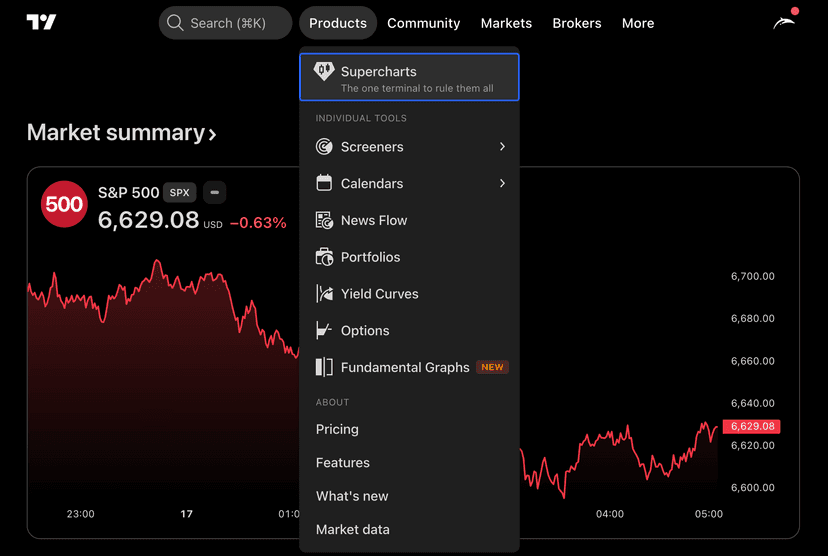
Second, in the top navbar, click on "Products", and then click on "Supercharts".
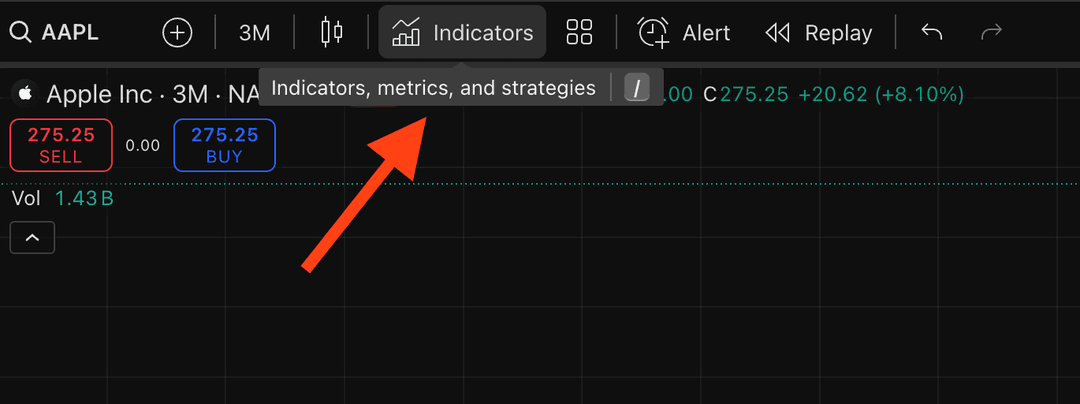
Third, find the icon for "Indicators" in the top navbar and click on it.
Lastly, click on "Invite Only", and there you should see an invite from "TrendRiderIO".
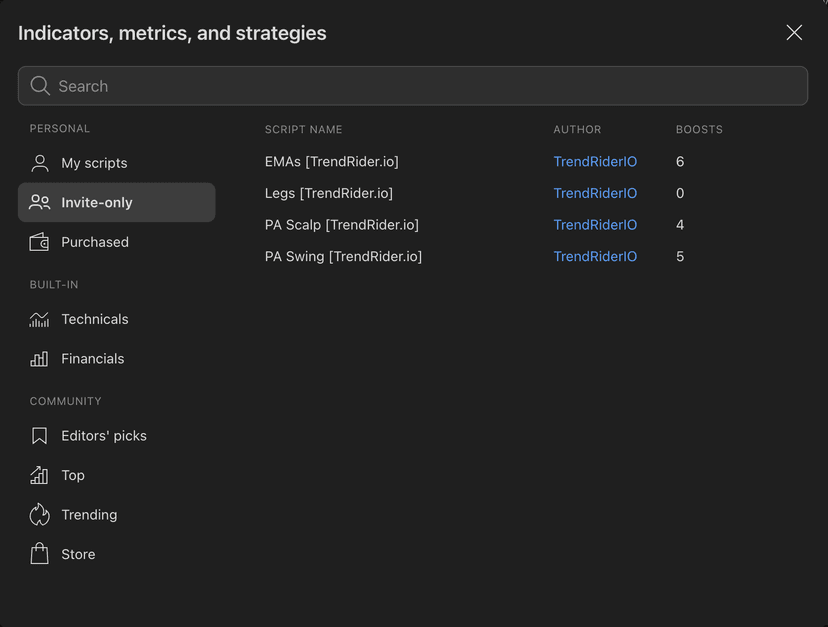
*Note: If the indicators are not loading, please try a hard refresh first. If they are still not showing, please message us on Discord.
6. What is the Financial Markets Scanner?
The Financial Markets Scanner automatically scans thousands of stocks, cryptocurrencies, and other market assets to find ones that might be interesting from a price action perspective. Instead of manually checking charts one by one, our scanner flags assets that meet the criteria for price action patterns described in our documentation. These results are not reviewed by our analysts, we simply surface assets that match our technical criteria. For better confluence, we recommend using the scanner in combination with the Institutional Tracker. It saves you hours of research time.
7. What is the Institutional Tracker?
The Institutional Tracker shows you what big investors like hedge funds and institutional money managers are buying and selling. When large institutions make moves, it can signal where the smart money is flowing. This feature helps you see these moves so you can make more informed decisions about your own trades.